




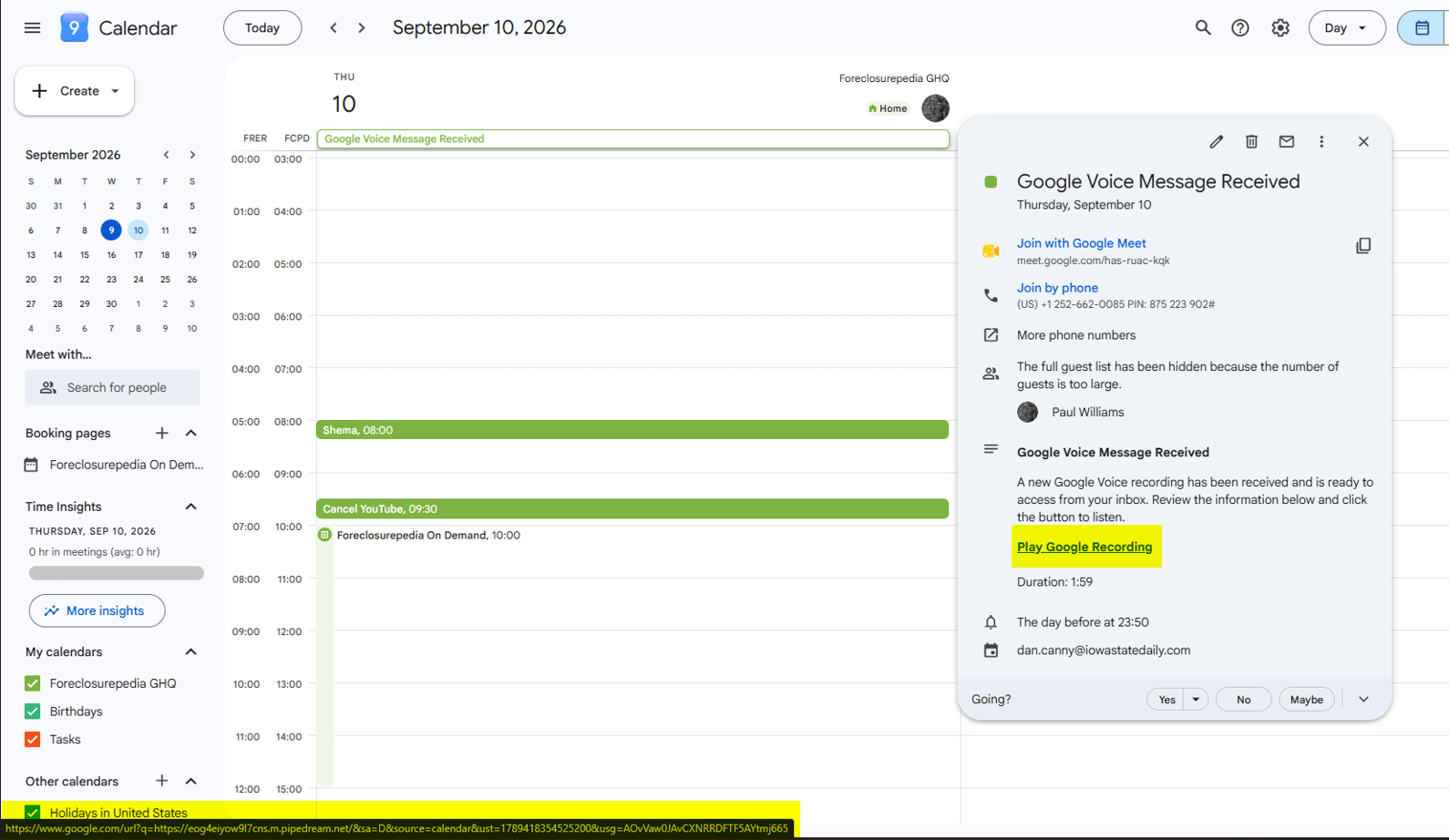
Somewhere on a server you’ll never see, a scammer built a fake event titled “Google Voice Message Received.” They mass-invited thousands of email addresses to it. Google Calendar, doing exactly what it was designed to do, auto-added that event to every calendar it touched. No click required. No download. No malicious attachment opened by a careless employee. The event simply appeared, sitting on the schedule like a legitimate meeting, waiting.
This is the threat model now. Attackers don’t need you to open an email anymore. They need you to trust your own calendar.
How the Con Works
The event mimics a Google Voice notification down to the last visual detail. It shows a fake voicemail duration, a fake “the day before” reminder timestamp, and a “Play Google Recording” link styled exactly like Google’s own UI. Everything about it is built to pass a half-second glance.
The tell is buried where most people never look: the status bar at the bottom of the browser. Hover over that “Play Google Recording” link and the real destination surfaces — not a Google domain, but a redirect through Pipedream, a legitimate developer platform that scammers have weaponized to obscure where the link actually leads. From there, the chain typically terminates at a credential-harvesting page built to look like a Google sign-in screen.
The guest list is hidden, flagged as “too large to display.” That’s not a bug. That’s confirmation the invite went to a scraped list numbering in the thousands, and your address was one line in a spreadsheet somebody bought or stole.
Why This Matters More Than the Usual Phishing Email
Traditional phishing training tells people to scrutinize the sender, check the “From” field, and hover over links in the email body. None of that applies here. The attack arrives inside a tool employees are conditioned to trust implicitly — their own scheduling software — and it does so without any action on the recipient’s part. By the time a user sees it, they’re not evaluating an unsolicited message. They’re evaluating what looks like a routine calendar notification.
For anyone in the mortgage field services and property preservation space — Field Service Technicians, Inspectors, vendor coordinators, servicer-facing staff — this isn’t an abstract IT nuisance. These are people juggling dozens of calendar invites a week from clients, vendors, and internal systems. A fake event blends into that noise instantly. One careless tap on “Yes” or “Maybe,” let alone the recording link itself, can hand a credential-harvesting operation a foothold into a corporate Google Workspace account tied to servicer data, contractor records, or payment systems.
What To Do About It
Do not click the recording link. Do not respond Yes, No, or Maybe — any RSVP confirms to the attacker that the address is live and monitored, which makes it more valuable on the next list sold or traded. Delete the event and report it as spam through Calendar’s event menu.
Then close the door it walked through. In Calendar settings, under Event Settings, set “Automatically add invitations” to “No, only show invitations to which I have responded.” That single change stops most of this campaign from ever reaching your view again.
The Bigger Picture
This campaign is not targeted. It is a mass-scale exploitation of a default setting that Google ships to make scheduling frictionless — and that friction-free design is precisely what makes it dangerous. Every organization running Google Workspace has employees with this default still turned on, which means every organization is currently exposed to an attack vector most security training has never addressed.
The mortgage field services industry runs on trust between vendors, servicers, and Field Service Technicians and Inspectors who rarely meet face to face. That trust is built on systems working the way they’re supposed to. When the calendar itself becomes an attack surface, the industry needs to start treating “routine” notifications with the same scrutiny it applies to unsolicited emails — because increasingly, there is no meaningful difference between the two.